
.png)
What matters when comparing VR radiography vendors
Evidence beyond opinion
A strong platform should have evidence beyond student satisfaction. Look for studies measuring OSCE performance, clinical assessment outcomes, image appraisal, and graduate preparedness.
Real radiographic decisions
Students should be able to position the patient, align the tube and detector, collimate, select exposure factors, acquire an image, review the result, and repeat the examination.
VR and desktop access
Immersive VR supports spatial learning in a simulated X-ray room. Desktop access helps scale practice outside the VR suite and gives students more opportunities to review and repeat.
Tethered and untethered VR
Radiography simulation should support both PC-connected VR and standalone headset use where appropriate. Wireless PC streaming is not the same as true untethered VR, because it still depends on a VR-ready computer, network performance, and local setup quality.
Advanced student and cohort analytics
A strong platform should show more than completion data. Look for confidence calibration, misconception risk, priority learning strands, lecturer flags, cohort signals, and suggested lecturer actions. These analytics help educators identify where individual learners need support and where teaching may need reinforcement across the cohort.
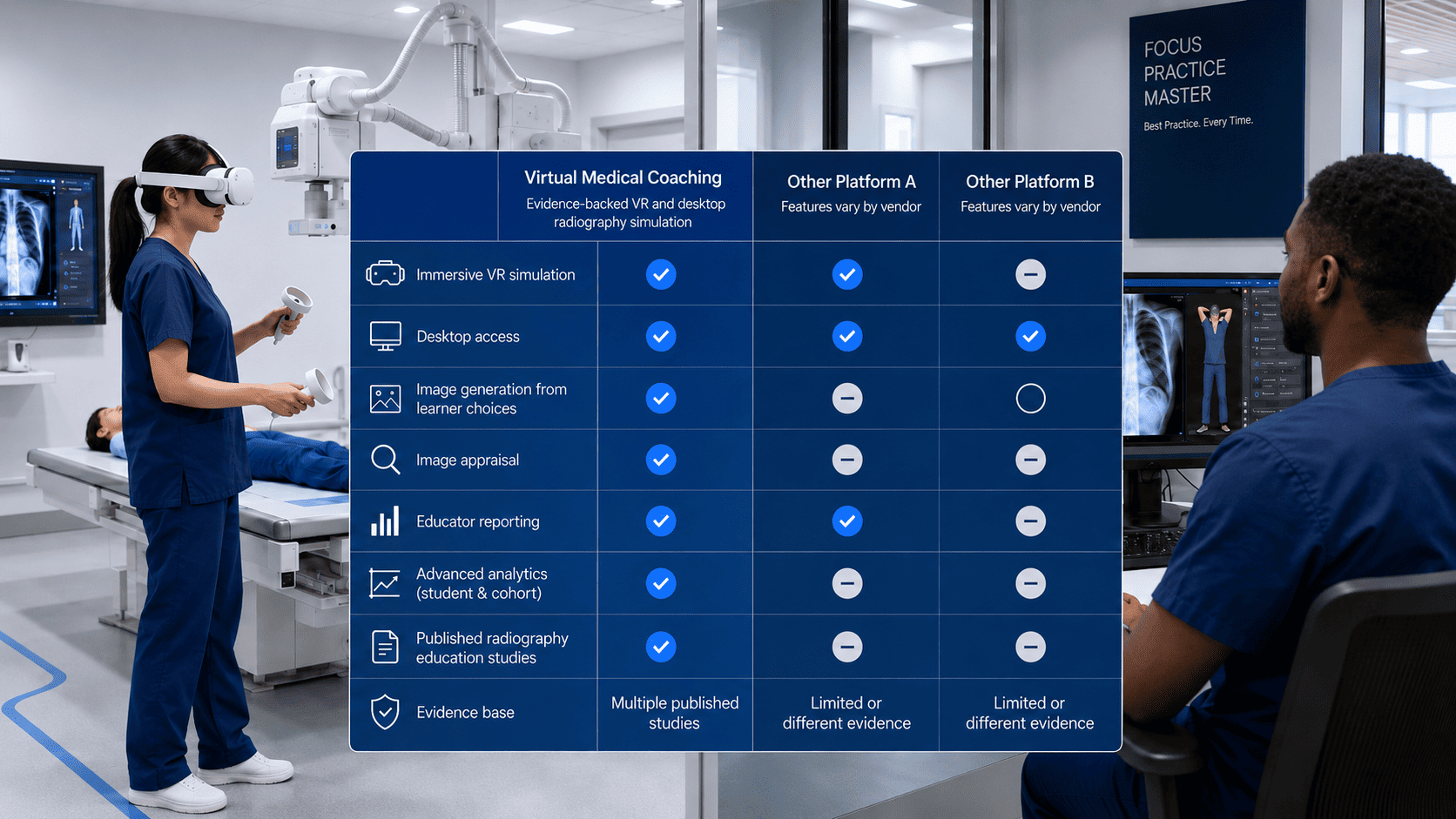
Compare radiography simulation platforms using real educational criteria
Not all radiography simulation platforms offer the same depth of learning. A meaningful comparison should look beyond whether the software is VR-based and assess how students practise positioning, exposure selection, image appraisal, anatomy recognition, feedback, reporting, and repeat attempts.

Immersive virtual reality training in radiography
Download our white paper on simulation-based learning, VR training technology, and the use of immersive VR in radiography education.
Compare radiography simulation platforms
Radiography simulation platforms vary widely in scope. Some published studies describe task-level simulation for a single anatomical region, while others examine course-level or programme-level use across broader radiography training. The most useful comparison is not simply whether a platform uses VR, but how deeply it supports radiographic workflow, learner decision-making, image evaluation, feedback, and educator reporting.
Named radiography simulation platforms
| Platform / simulator | Access mode | Reported scope | Educational scope | Assessment focus |
|---|---|---|---|---|
| CETSOL VR Clinic | VR | Hand radiography | Task-level | Student perception and positioning performance |
| Shaderware | Desktop | Desktop radiography simulation | Desktop-based practice | Technique selection, image review, and radiographic decision-making |
| Virtual Medical Coaching | VR and desktop | More than 150 radiographic projections across the radiography curriculum | Course-level, semester curriculum, and programme-level | Student performance, image evaluation, blinded OSCE performance, graduate preparedness, and learning outcomes |
| VitaSim | VR | Wrist radiography | Task-level | Positioning accuracy |
This comparison is based on platforms named in published radiography simulation studies, together with known platform access modes. It reflects the reported scope and educational focus, not every current feature of each platform.
What to compare when choosing radiography simulation software
| Comparison area | Virtual Medical Coaching | Other platforms described in published studies | Why it matters |
|---|---|---|---|
| Curriculum scope | Multi-projection and curriculum-level radiography simulation | Published examples include hand or wrist-focused task-level simulation | A wider curriculum scope supports repeated practice across more of the radiography programme. |
| VR and desktop access | Available in VR and desktop modes | Some published studies describe narrower task-level or single-mode simulation use | Desktop access helps students practise, revise, and review outside the VR lab. |
| Radiographic workflow | Supports positioning, exposure selection, Automatic Exposure Control (AEC), image appraisal, and repeat attempts | Published task-level platforms may focus on a narrower skill area | Radiography education requires more than positioning alone. |
| Image outcomes | Designed around learner choices and radiographic decision-making | Some simulation approaches focus mainly on task performance or positioning accuracy | Students need to see the consequences of their own technical decisions. |
| Educator reporting | Includes educator visibility through the learning platform | Reporting depth varies by platform and study design | Educators need evidence of learner progress, attempts, feedback, and areas needing support. |
| Evidence base | Supported by course-level and programme-level research using Virtual Medical Coaching | Other platforms have published evidence in more limited task-level contexts | Stronger evidence comes from studies that assess learning across a course or programme, not only a single task. |
Radiography simulation software questions
What should I compare when choosing radiography simulation software?
Compare curriculum scope, VR and desktop access, radiographic workflow, image outcomes, learner feedback, educator reporting, and published evidence. A useful platform should support more than isolated positioning practice.
Is wireless VR the same as untethered VR?
No. Wireless VR typically streams from a VR-ready computer over Wi-Fi, so the experience still depends on the computer's capabilities, network performance, and local setup quality. Untethered VR operates directly on the headset, eliminating the need for a connected computer. Read all about it here.
Why does desktop access matter in radiography simulation?
Desktop access gives students more opportunities to practise, revise, and review outside the VR lab. It also supports image appraisal, repeat learning, and flexible access when headsets are not available.
What is the difference between task-level and curriculum-level simulation?
Task-level simulation usually focuses on a narrow skill or anatomical area. Curriculum-level simulation supports repeated practice across a wider range of projections, technical decisions, feedback, and learning outcomes.
Does radiography simulation software need educator reporting?
Yes. Educator reporting helps teaching teams review learner progress, attempts, feedback, image appraisal, and areas needing support. Without reporting, simulation activity is harder to connect to teaching decisions.
Can students and educators see individual performance analytics?
Yes. Students can review their own results, including task outcomes, confidence level, areas of uncertainty, image critique feedback, and items flagged for lecturer review.
Educators can see individual attempts as well as cohort-level signals, including developing or priority learning strands, confidence calibration, common misconceptions, and suggested lecturer actions. This helps lecturers identify where one student needs support and where the wider cohort may need targeted review before a lab, tutorial, or assessment.